Complete PDF Editing with MaraDocs
PDF Annotation Made Easy
With MaraDocs, PDFs can now be fully edited. In addition to the classic functions of rearranging, splitting or rotating PDF pages, you now get a powerful editor to edit individual pages.
Often you need to quickly highlight a few lines in a PDF or use an arrow to point out an important section. The new PDF editing provides the most important tools in a simple way.
- Insert text with intelligent suggestions from your previous entries – frequently used labels can be reinserted with one click.
- Freehand drawings directly on the page to add sketches, arrows or handwritten notes.
- Highlight important text passages with the marker tool – in different colors and thicknesses.
- Shapes like rectangles, circles, lines and arrows can be inserted with just a few clicks and you can customize color and line thickness individually.
PDF Editing Video Overview
In this short video you will see all annotation tools in action and get an overview of how quickly PDFs can be annotated with MaraDocs.
Click for sound
PDF Editing in MaraDocs Simply Explained
How to Access PDF Editing Mode in MaraDocs
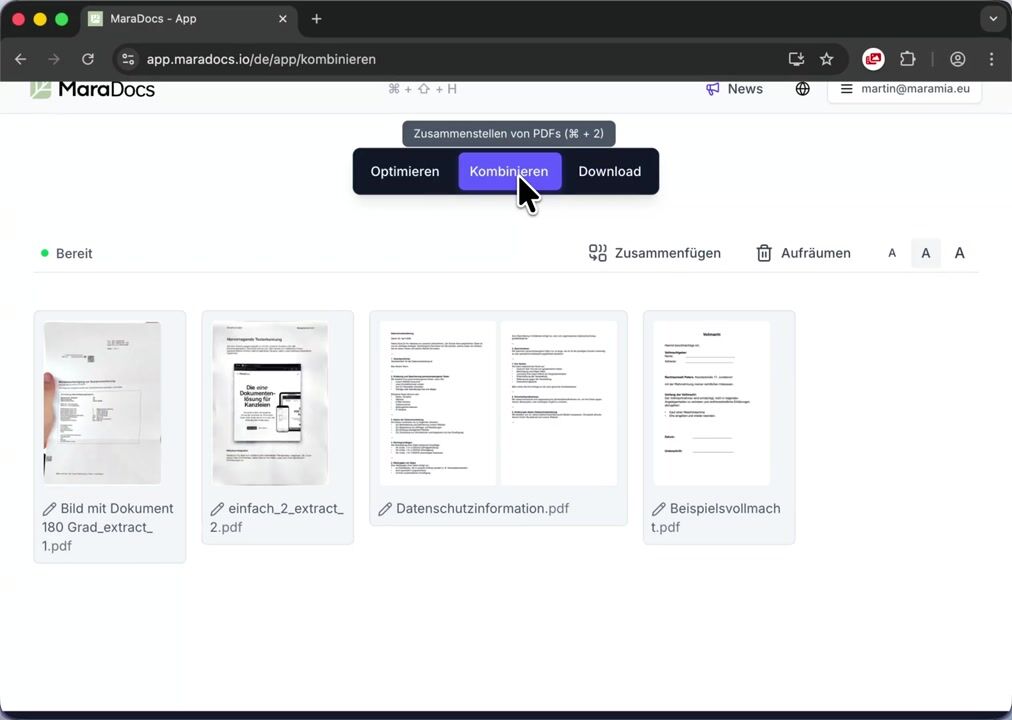
In the combine area of the app, simply click on the pen icon on any PDF page. A separate area will then open where you can easily perform all PDF editing operations.
Repeat Text Insertions with One Click – The TT Tool
A special feature of PDF editing in MaraDocs is the TT tool. With it, you can transfer an already placed text insertion to another page with just one click – at exactly the same position and with identical formatting. TT
Simply switch to the desired target page and click on the TT icon. MaraDocs places your most recently inserted text at exactly the same location – ideal for recurring labels such as attachments, stamps or page markings.
Particularly clever: If you previously inserted, for example, Attachment 1 on one page, MaraDocs automatically recognizes the numbering and adds Attachment 2 at the same position on the next page, then Attachment 3 and so on – without manual counting.
Font, size, color and alignment are also retained, so your labels remain consistent across all pages.
I wanted a fast and simple PDF editing tool for my law firm that provides me with the daily functions I need without annoying me with ads or unwanted features. That's why we built it into MaraDocs.
MaraDocs kostenlos ausprobieren
Starten Sie jetzt und optimieren Sie Ihre PDFs mit unseren leistungsstarken Tools.
Kontaktieren Sie uns gerne auch per E-Mail:
info@maradocs.io