Annotate PDFs in MaraDocs – Text, Highlights, Shapes and the Smart TT Tool
The new PDF editing in MaraDocs: insert text with intelligent suggestions, draw freehand, highlight important sections, add shapes – and use the TT tool to repeat text insertions on additional pages with a single click.
PDFs can now be annotated directly in your browser in MaraDocs – without any additional software. With just a few clicks, you can insert text, draw freehand, highlight important sections, or add arrows and shapes. And perhaps the best feature: repetitive text insertions like Exhibit 1, Exhibit 2, Exhibit 3 can be placed at the same position with a single click using the new TT tool – including automatic numbering.
📋 Quick Overview
- •Insert text – with intelligent suggestions from your previous entries
- •Freehand drawings – add sketches, notes or arrows by hand
- •Highlight important sections – marker tool in various colors and thicknesses
- •Add shapes – rectangles, circles, lines and arrows with just a few clicks
- •TT tool – repeat text insertions on another page with a single click
- •Automatic numbering – "Exhibit 1" becomes "Exhibit 2" on the next page
The New PDF Editing in Video Overview
In this short video, you'll see all annotation tools in action and get an overview of how quickly PDFs can be annotated with MaraDocs.
How to Open PDF Editing START
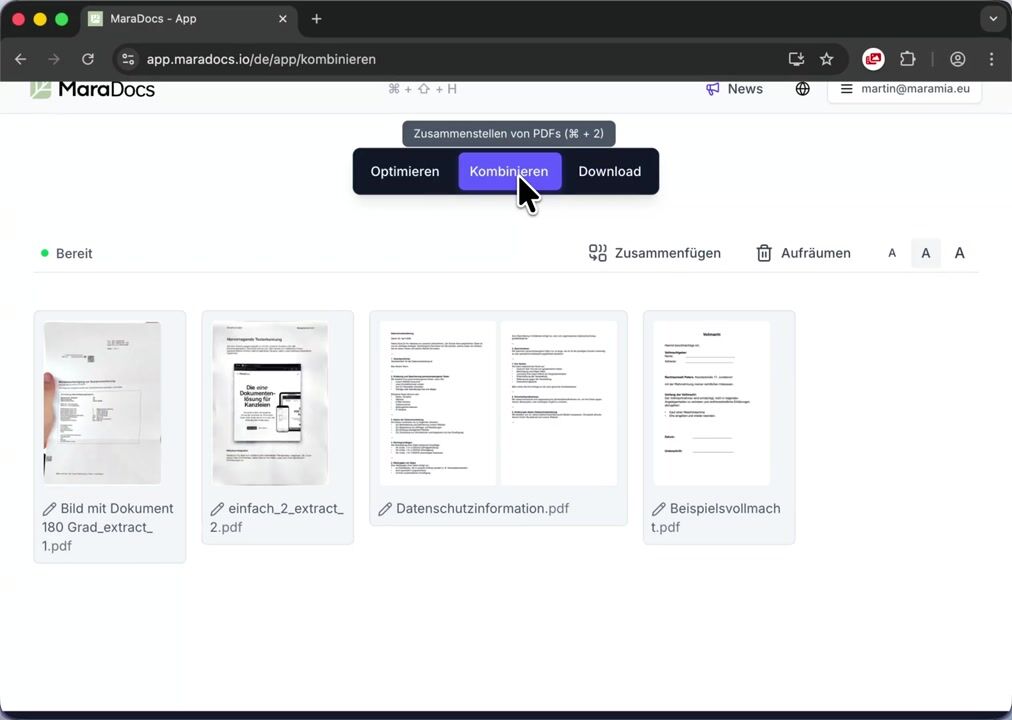
In the Combine section of the MaraDocs app, you'll find a pencil icon () for each PDF page. Clicking it opens a dedicated editing area where you can easily make all your annotations.
Annotation Tools Overview TOOLS
The new PDF editing offers all the tools you really need in your daily law firm or office work – without cluttered menus.
Insert Text with Intelligent Suggestions
When inserting text, MaraDocs automatically suggests relevant terms from your previous entries. Frequently used labels like "Exhibit", "Confidential" or "Original" are back on the page with just one click – without retyping.
You can customize font, size, color and alignment individually. This keeps the appearance of your documents consistent.
Freehand Drawings
With the pen tool, you can draw freehand directly on the page. Ideal for quick sketches, handwritten notes or highlighting areas with an arrow.
Highlight Important Sections
The classic marker tool for PDFs is of course included. Highlight important passages in different colors and line thicknesses – just as you're used to with a highlighter on paper.
Add Shapes
You can insert rectangles, circles, lines and arrows with just a few clicks. Color and line thickness can be customized individually, making it easy to visualize even complex matters clearly.
The TT Tool: Repeat Text Insertions with One Click TT-TOOL
A truly unique feature of the new PDF editing is our TT tool ( TT in the toolbar). With it, you can transfer a text insertion you've already placed to another page with just one click – at exactly the same position and with identical formatting.
Simply switch to the desired target page and click on the TT icon – your text will appear at exactly the same position as before.
Automatic Numbering from "Exhibit 1" to "Exhibit 2"
Particularly clever: if you previously inserted Exhibit 1 in the corner of a page, for example, MaraDocs automatically recognizes the numbering and adds Exhibit 2 on the next page at the same position, then Exhibit 3 and so on – without manual counting.
This allows you to create consistently numbered exhibit labels across dozens of pages in seconds.
Font, Size, Color and Alignment are Preserved
The TT tool doesn't just copy the position, but also the complete styling of your text insertion. Font, size, color and alignment remain identical across all pages, making your labels look professional and consistent.
Learn More
A comprehensive overview of all annotation tools as well as additional screenshots can be found on the feature page:
Annotate PDFs in MaraDocs – to the feature pageTry It Yourself Now
The new PDF editing is now available to all MaraDocs users free of charge. Simply try it out with your next exhibit list, contract draft or legal brief.
🚀 Get started now: Try MaraDocs for free
Subscribe to our newsletter
Stay up to date with us and receive the latest news, articles, and resources by email.